A Facebook ad account spending limit comes in two kinds. You set the ad account spending limit, a lifetime cap across all campaigns, and change it in Payment settings. Meta sets the daily spending limit from your advertising and payment history. It rises as you spend near it, and faster after you verify a payment method or your business.
We built our Meta agency accounts in GLP-1 telehealth, one of Meta’s most heavily reviewed niches, so these limits are part of our daily work. This guide covers how both limits behave, how to tell which one paused your ads, and the routes Meta gives to raise each. Everything below is Meta’s own wording or settings, checked on November 5, 2026.
Which Facebook spending limit paused your ads
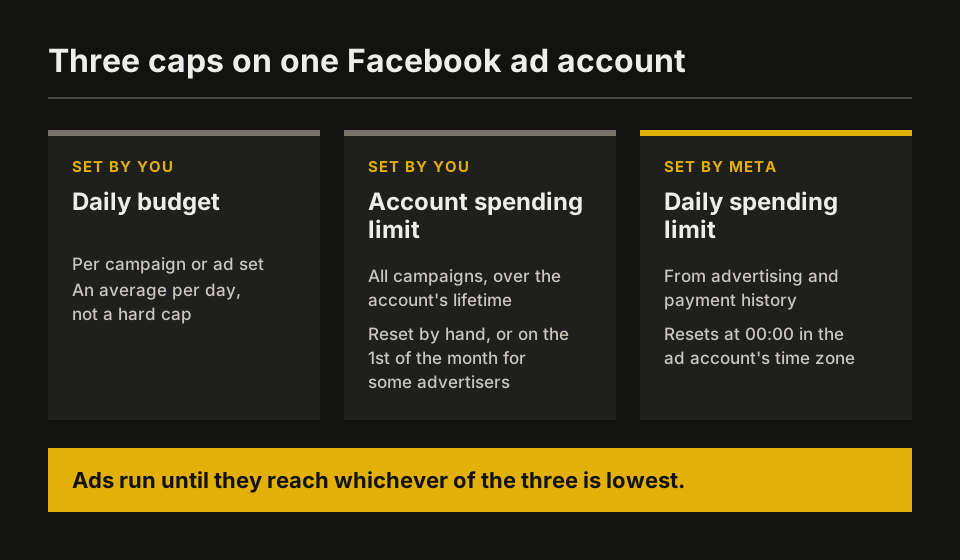
Meta’s help center lists three amounts that cap spend: your daily budget, your ad account spending limit and the daily spending limit Meta sets. In Meta’s words, “Your ads will run each day until you reach one of these amounts, whichever is lowest.”
| What you see | Which limit it is | Who sets it | What resets it |
|---|---|---|---|
| All ads in the account stop and stay stopped | Ad account spending limit | You (an admin) | You change, reset or remove it |
| Ads stop at the same point each day, then restart the next day | Daily spending limit | Meta | It resets at 12:00 AM in the ad account’s time zone |
| One campaign stops, others keep running | Campaign spending limit | You | You raise or remove it in Ads Manager |
| You get charged mid-month, ads keep running | Payment threshold (not a limit) | Meta | Each successful payment |
Meta also says that if your ads paused and you haven’t reached your budget or account spending limit, “you may have hit your daily spending limit set by Meta.”
How the ad account spending limit works
The ad account spending limit is a cap you choose. Meta describes it as “a lifetime limit on the total amount your ad account can spend across all campaigns.” It doesn’t reset on its own: you reset it by hand in Payment settings, and Meta says “some advertisers may have the option to set an automatic reset on the 1st of the month.”
To change it, Meta’s steps are:
- Go to Payment settings for the ad account. You must be an admin of the ad account.
- In the Account spending limit section, open the 3-dot menu and choose Change.
- Enter the new limit and confirm it.
Meta says the new limit applies “in about 15 minutes. Then, your ads start running again.” What you already spent counts toward the new limit. If you see an error about too many changes, Meta’s advice is to “wait about an hour before trying again.” You can also reset the amount spent to zero or remove the limit in the same menu.
How Meta’s daily spending limit works
Meta’s daily spending limit is “the maximum amount you’re able to spend on ads each day,” set “for most advertisers based on their advertising and payment history.” When you reach it, “your ads pause and resume the next day when the limit resets,” at 12:00 AM or 00:00 in the ad account’s time zone. Check it in Payment settings.
Meta lists three things that typically raise it automatically:
- you build advertising history
- you follow Meta’s advertising policies
- you spend up to or near your limit
It can also go the other way. Meta “may readjust your daily spending limit” when you have a new business portfolio, ad account, Page or app, or ads and accounts with issues such as low ad quality rankings or low feedback scores. Separately, Meta’s restrictions page says it may limit “how much an advertiser can spend each day” while it checks that an advertiser is following its policies. That is a restriction, covered in our guide to a restricted Facebook ad account, not the normal daily limit.
Two details matter at higher spend. You can set a daily budget above the daily spending limit, and as the limit rises, Meta says “you’ll automatically spend up to the new limit.” And “If your ad account uses monthly invoicing, Meta does not set a daily spending limit.”
How to increase your Facebook daily spending limit
Meta gives four routes, in this order:
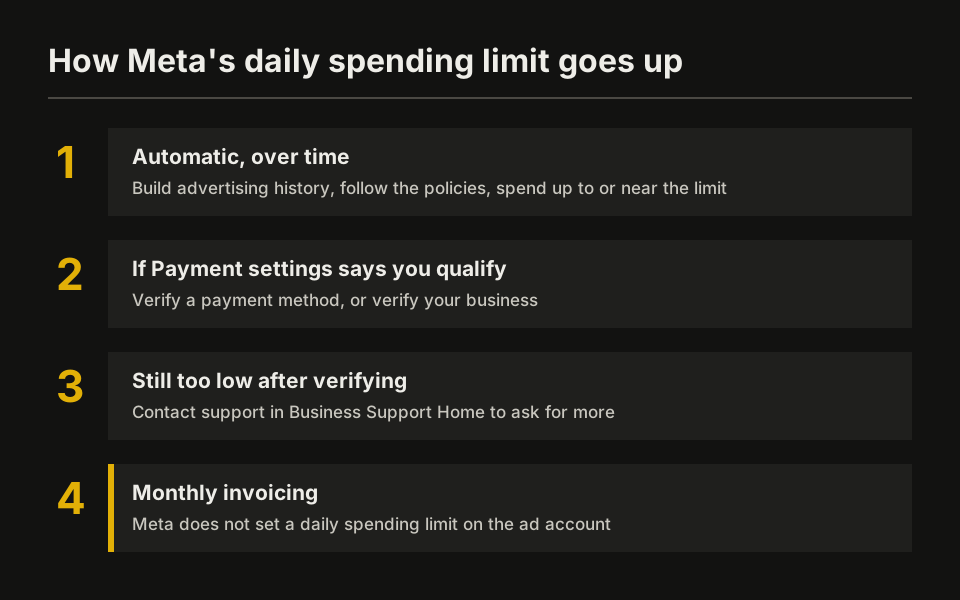
- Wait for the automatic increase. Spend up to or near the limit on campaigns that follow the policies. Meta doesn’t publish how fast the limit grows.
- Verify your payment method, if you qualify. In Payment settings, an eligible account shows “You’ve qualified for a higher ads daily spending limit.” You confirm the card with a one-time code from your bank, or with a temporary $1.00 hold that carries a 4-character code. If Meta later lowers the limit, you “might qualify to verify your payment method after 30 days.”
- Verify your business. Meta says a decision “can be made in as little as 10 minutes and as long as 14 business days.” Your legal business name, address, phone and website must match your records exactly, and your site must load over HTTPS. You need full control of the business portfolio.
- Ask support for more. If you verified and still need a higher limit, Meta says you can contact support in Business Support Home to check if you’re eligible for an additional increase.
If none of these apply yet, Meta’s answer is to wait for the limit to reset at midnight and keep building history. For how to raise budgets in steps once the limit allows it, see how to scale Meta ads.
Why a new Facebook ad account starts with a low limit
A new ad account has no advertising or payment history, and history is what both of Meta’s money settings grow from. Meta sets a new account’s payment threshold “to a small amount” (its example is $25) and “may raise your payment threshold” as payments go through. It calls the threshold “a way to build up a good payment history with Meta.” The daily spending limit follows the same logic: it grows with history and with spend near the limit.
A payment threshold doesn’t limit spend. Meta is explicit: “Your ads continue running after you reach your payment threshold. Only budgets or spending limits pause your ads.”
This is also why a business that needs high daily spend from day one has two options. One is to build history on its own account through the routes above. The other is to run on an established agency ad account that already has its own history. Our guide to agency ad accounts explains how those work and what they don’t change.
Spending limits in regulated niches
Regulated categories add their own checks on top of the limits. In GLP-1 telehealth, for example, Meta’s Drugs and Pharmaceuticals standards require telehealth providers to hold LegitScript certification before they promote prescription drugs, and Meta’s authorization attaches to the specific ad accounts selected. A limit increase doesn’t change those rules, and those rules don’t raise a limit. Plan both separately: what your niche needs to run at all, and how much the account can spend each day.
FAQ
What is the default spending limit on a new Facebook ad account? Meta doesn’t publish one number. It sets the daily spending limit “for most advertisers based on their advertising and payment history,” so a new account with no history starts low and rises as it builds history.
Why did my Facebook ads stop before reaching my budget? Either the ad account spending limit was reached, or Meta’s daily spending limit was. If the ads restart the next day by themselves, it’s the daily limit. If they stay stopped, check the account spending limit in Payment settings.
Can I remove Meta’s daily spending limit? Not directly. You can remove the account spending limit you set. Meta’s daily limit rises with history, verification or a support request, and Meta doesn’t set one on accounts that use monthly invoicing.
Does the payment threshold limit my spend? No. Reaching the threshold triggers a charge. Your ads keep running.
How long does a change to the account spending limit take? About 15 minutes, according to Meta. Ads then start running again.
Sources
- Meta Business Help Center, About daily spending limits set by Meta (advertising and payment history; pause and resume; factors; readjust for new assets; monthly invoicing; reset at 12:00 AM) · accessed
- Meta Business Help Center, How to increase your Meta daily spending limit (verify payment method, $1.00 hold, 30 days; verify business, 10 minutes to 14 business days; contact support) · accessed
- Meta Business Help Center, How budgets, spending limits, prepaid balance limits and your payment threshold differ (lifetime account limit; reset on the 1st for some advertisers; daily budget above the daily limit; threshold does not pause ads) · accessed
- Meta Business Help Center, Change your ad account spending limit (admin only; about 15 minutes; amount spent carries over; wait about an hour after too many changes) · accessed
- Meta Business Help Center, About campaign spending limits · accessed
- Meta Business Help Center, About payment thresholds for Meta ads (small starting threshold, $25 example, may be raised after successful payments) · accessed
- Meta Business Help Center, About advertising restrictions (temporary limits on daily spend while Meta checks compliance) · accessed
- Meta Business Help Center, About Meta's Prescription Drugs advertising policy (authorization attaches to the ad accounts selected) · accessed
- Meta Transparency Center, Advertising Standards: Drugs and Pharmaceuticals (telehealth providers certified with LegitScript) · accessed