When a GLP-1 telehealth brand’s Facebook ad account is restricted, open Account status overview in Business Support Home. If it says the ad account is disabled, it’s a policy restriction: fix the cause, then request a review. If it lists limits on spend, payments, admins or new ad accounts, it’s temporary: do the steps under What you can do.
Policy checked on October 30, 2026.
- If Meta says the ad account is disabled: fix what Meta flagged, then request a review. The full route is in what to do when a telehealth ad account is disabled.
- If Meta lists limits on spend, payments, admins or new ad accounts: complete each step under What you can do (confirm your identity, complete verification, secure your account).
- If ads pause each day and resume the next: that’s Meta’s daily spending limit, not a restriction. It resets at midnight in the ad account’s time zone.
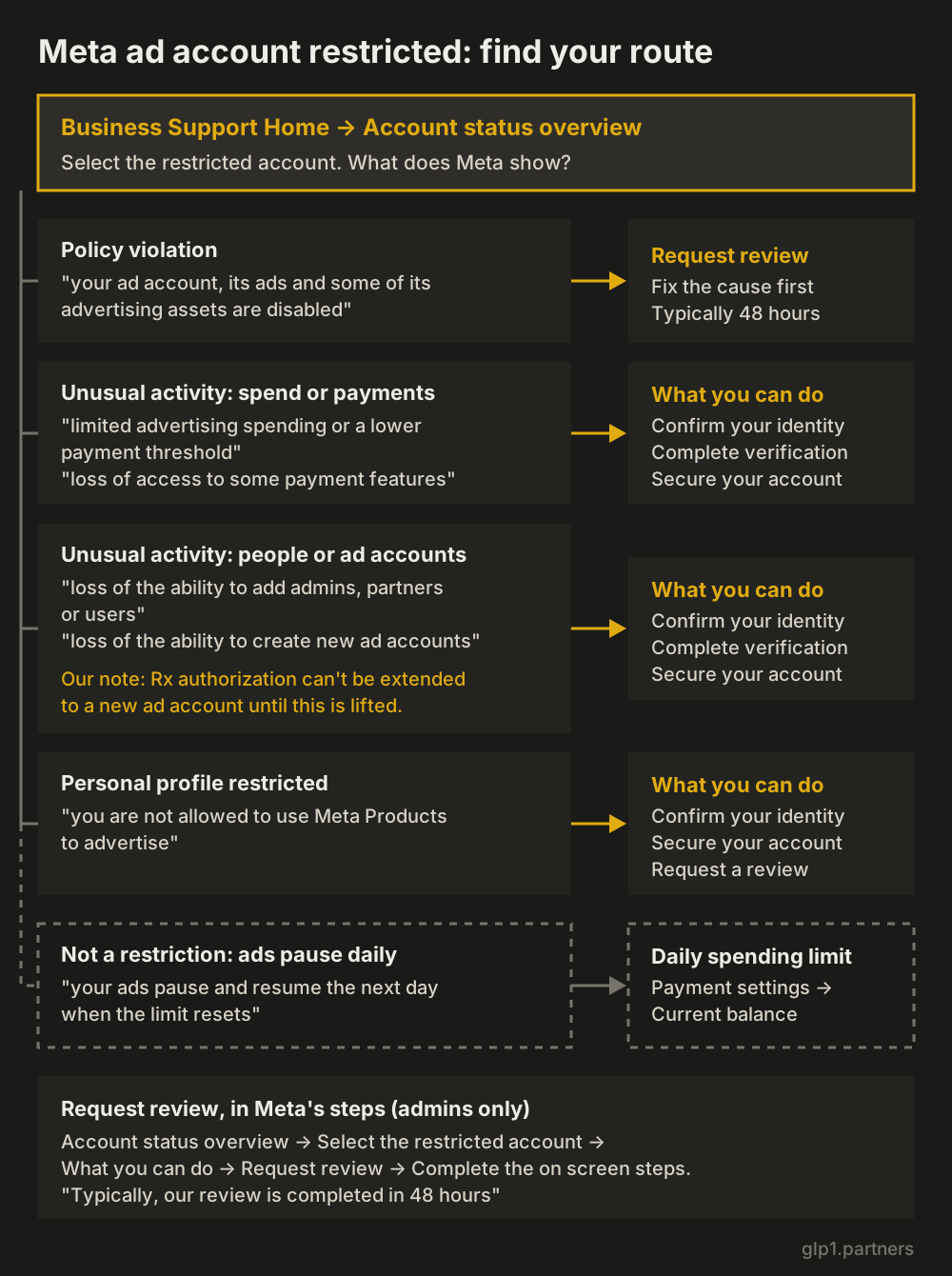
Restricted or disabled: the 2 types of Meta advertising restriction
Meta’s help page “About advertising restrictions” splits restrictions into 2 types. A restriction for policy violations disables the ad account. A restriction for unusual activity limits features instead: Meta says it “may temporarily restrict certain features while we investigate the issue.”
| Type | What Meta says it limits | What you see | Route | Telehealth effect |
|---|---|---|---|---|
| Policy violation | “your ad account, its ads and some of its advertising assets are disabled” | Account shows as disabled | Fix the cause, then Request review | Rx campaigns in that account stop |
| Unusual activity: spend | “limited advertising spending or a lower payment threshold” | Spend stops below budget | What you can do steps | Launch budgets can’t be reached |
| Unusual activity: payments | “loss of access to some payment features” | Payment options missing | What you can do steps | Billing changes wait |
| Unusual activity: people | “loss of the ability to add admins, partners or users” | Can’t add a person or agency | What you can do steps | No new media buyer or agency partner |
| Unusual activity: ad accounts | “loss of the ability to create new ad accounts” | Can’t create an ad account | What you can do steps | No new account for Rx authorization |
| Missing 2FA | “Meta may restrict or remove people’s access to advertising” | Admins lose ad access | Turn on two-factor authentication | Rx campaign managers locked out |
| Daily spending limit (not a restriction) | “your ads pause and resume the next day when the limit resets” | Ads stop at the same amount daily | None; it resets | Meta may readjust it on a new ad account |
Why Meta limits new telehealth ad accounts
Meta can limit a new telehealth ad account even when no ad has broken a rule. One of the 5 scenarios on its restrictions page fits a new GLP-1 brand closely: Meta “may temporarily apply limits on how much an advertiser can spend each day, how often they are billed or which payment features they can access until we can be sure they’re consistently following our policies.”
Most GLP-1 brands launch with a new business portfolio, ad account and Page, and Meta says it “may readjust your daily spending limit” if “You have a new business portfolio, ad account, Page or app.”
If Meta limited spend or payments: what the limit means
A spend or payment limit caps the account while Meta investigates. The route is the list under What you can do. Two Meta mechanisms explain what you see:
- Payment threshold. A new account is charged each time costs reach a small threshold (“a payment threshold of $25” in Meta’s example), which may rise as payments clear.
- Daily spending limit. It usually rises as you “Build your advertising history,” “Follow our advertising policies” and “Spend up to or near your limits.” Accounts on monthly invoicing don’t get one.
Either one can hold a GLP-1 launch below its planned daily budget, so check Payment settings, Current balance, before you set budgets. How each limit works and how to raise it: Facebook ad account spending limits. The spend ramp is in our guide to keeping a telehealth Meta ad account in good standing.
If you can’t add admins, partners or new ad accounts
When Meta removes “the ability to add admins, partners or users” or “the ability to create new ad accounts,” a GLP-1 telehealth brand keeps advertising in its existing accounts but can’t expand its Rx setup or its team.
Rx authorization is tied to ad accounts. In Meta’s LegitScript route, a telehealth provider will “select the ad accounts that you want to authorize to advertise,” and can later extend it “to other ad accounts within their same business portfolio.” With new ad accounts blocked, Rx campaigns stay in the accounts already authorized.
Partners are businesses such as “an agency you work with,” so a new agency or media buyer can’t be added until the limit lifts.
Take each step under What you can do, and don’t rebuild the setup elsewhere. Meta lists “Attempting to create new ad accounts or other business assets with the intent to repeat violations” as evading enforcement.
If Meta asks you to confirm your identity or complete verification
If Meta asks a telehealth brand to confirm identity or complete verification, do that step first. Business verification runs from Security Center in Meta Business Suite, needs full control of the portfolio, and “is required to access certain advertising, developer, billing and spending features.”
- Legal name, address, phone and website must “exactly match the details of your legal business entity.” With no matching record, Meta may ask for documents such as a business license.
- The website must load over HTTPS.
- A decision “may take up to 14 business days,” and editing business details later means verifying again.
Telehealth brands face a second check: Rx authorization asks for the URL “that has been certified by LegitScript,” and “If the URL you provide has not been certified or is not in good standing with LegitScript, you will not be able to proceed.” Keep the legal entity, address and certified domain consistent across both.
If there’s no option to request a review
When a Facebook ad account is restricted with no option to appeal, Meta’s pages point to 2 reasons: the person looking isn’t an admin (“To request a review, you must be an admin on the account”), or Meta wants other steps done first.
- Sign in as an admin of the restricted asset and open Account status overview.
- Complete every listed step (identity, verification, account security) before you look for Request review.
- If no restriction shows and ads still don’t spend, it’s a delivery problem. See Facebook ads not delivering for a telehealth brand.
- If the steps don’t match what you see, use Contact support in Business Support Home.
Meta says “There is a limited number of times you can request an advertising restriction review. Once the review is completed, the decision is final.” After a reinstatement, “Any ads running before the restriction will not be automatically restarted,” so restart Rx campaigns only in ad accounts that still hold authorization.
Older guides, and Meta’s Advertising Standards page, still say “Account Quality”; the help pages now use Business Support Home. Lost conversion data from Meta’s “data sharing restrictions” on a data source category isn’t an advertising restriction either; see Meta health data restrictions for telehealth.
New accounts, warm-up and appeal windows: what Meta’s pages say
Meta’s help pages answer 4 questions that come up after a restriction. On the first, they contradict top-ranking guides that say you can create a new ad account if everything else fails. Checked October 30, 2026:
| Question | What Meta’s pages say |
|---|---|
| Should I open a new ad account? | “Attempting to create new ad accounts or other business assets with the intent to repeat violations after we’ve disabled existing accounts” is evading enforcement. An unusual-activity limit may block new accounts anyway. |
| Do I need to “warm up” the account? | Meta doesn’t use the word. Its mechanism is a threshold that starts small ($25 in its example) and a daily limit that rises with history, compliance and spending near the limit. |
| Does pixel or dataset age set the limit? | Not stated on any Meta page we checked. |
| Is there a fixed window to appeal? | Meta’s 6-month rule covers an ad account “disabled for a policy violation” that stays ineligible: “After this timeframe, the account can’t be reinstated.” No duration is given for unusual-activity limits. |
Telehealth checklist before the next budget step
Before a GLP-1 brand raises Meta spend after a limit lifts, check each item:
- Two-factor authentication is on for every admin (portfolios under 90 days old can require it).
- Each ad account has at least 2 admins, since a profile restriction can disable “Any ad accounts where they’re the only attached user.”
- Business verification matches the legal entity exactly.
- The LegitScript-certified URL is the one in your Rx authorization, and every Rx ad account is authorized.
- Rx campaigns target only people 18 or older in countries where you’re certified.
- Budgets fit under the current daily spending limit, and failed or disputed payments are settled.
FAQ
How long does a Facebook ad restriction last? For a policy restriction review, Meta says “Typically, our review is completed in 48 hours, although it may take longer in some cases.” For unusual-activity limits it gives no duration, only that it restricts features “while we investigate.”
Why is my ad account restricted for no reason? Several of Meta’s 5 scenarios have nothing to do with an ad you ran: a suspected hack, missing two-factor authentication, and “unusual payment or account activity, high rates of failed payments or disputed payments.” Account status overview names the restricted asset and the steps Meta wants.
How do I get my Facebook ad account unrestricted? Do every step Meta lists under What you can do for that account. A policy restriction lifts only if a review reinstates the account. Meta describes unusual-activity limits as temporary, applied “while we investigate the issue.”
Sources
- Meta Business Help Center, About advertising restrictions (5 scenarios, policy vs unusual-activity restrictions, 4 levels, unusual-activity limit list, 6-month rule, personal profile note) · accessed
- Meta Business Help Center, Request a review for a restricted advertising account (4 steps, admin only, 48 hours, ads not restarted, limited reviews, decision final) · accessed
- Meta Business Help Center, Troubleshoot a disabled or restricted account (confirm your identity, complete verification, secure your account, request a review) · accessed
- Meta Business Help Center, About Meta Business Support Home (account overview shows disabled accounts and advertising restrictions; contact support) · accessed
- Meta Business Help Center, How to verify your business in Meta Business Suite (features gated by verification, exact legal match, HTTPS, up to 14 business days, re-verify after edits) · accessed
- Meta Business Help Center, About Meta's Prescription Drugs advertising policy (LegitScript for telehealth, ad accounts selected, same-portfolio extension, certified URL) · accessed
- Meta Business Help Center, About daily spending limits set by Meta (pause and resume, readjusted for new assets, increase factors, monthly invoicing) · accessed
- Meta Business Help Center, About payment thresholds for Meta ads ($25 example, payment history) · accessed
- Meta Business Help Center, About two-factor authentication for your business portfolio (access to advertising, 90-day option) · accessed
- Meta Business Help Center, Give a partner access to business assets in your business portfolio (agency partners, full control) · accessed
- Meta Business Help Center, Common examples of Meta advertising policy violations (evading enforcement with new ad accounts) · accessed
- Meta Business Help Center, Understand data sharing restrictions based on data source categories (data sharing restrictions limit event data, not advertising access) · accessed
- Meta Transparency Center, Advertising Standards: Drugs and Pharmaceuticals (LegitScript for telehealth, 18+) · accessed
- Meta Transparency Center, Introduction to the Advertising Standards (legitimate business or individual; review in Account Quality) · accessed