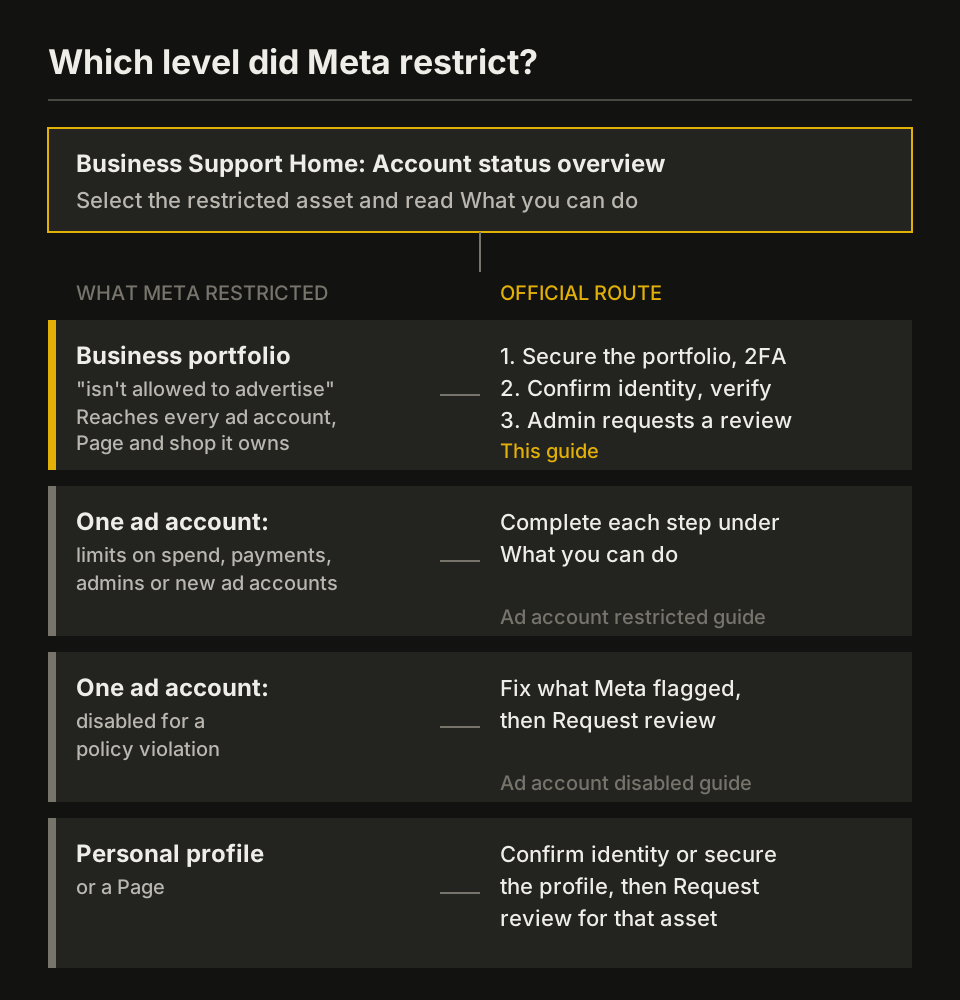
When a GLP-1 telehealth brand’s Meta business account (its business portfolio, formerly Business Manager) is restricted, no ad account it owns can advertise. Open Account status overview in Business Support Home, select the portfolio itself, and do each step under What you can do: secure it, confirm identity, verify the business, then request a review.
Policy checked on October 30, 2026; Meta’s restriction and review pages rechecked November 2, 2026.
- If the business portfolio “isn’t allowed to advertise”: follow the 4 steps on this page, as an admin of the portfolio.
- If only one ad account has limits on spend, payments, admins or new ad accounts: see Facebook ad account restricted at a GLP-1 telehealth brand.
- If one ad account is disabled for a policy violation: see what to do when a telehealth ad account is disabled.
- If a personal profile or a Page is restricted: confirm identity or secure the profile, then request a review of that asset.
What a business portfolio restriction blocks at a telehealth brand
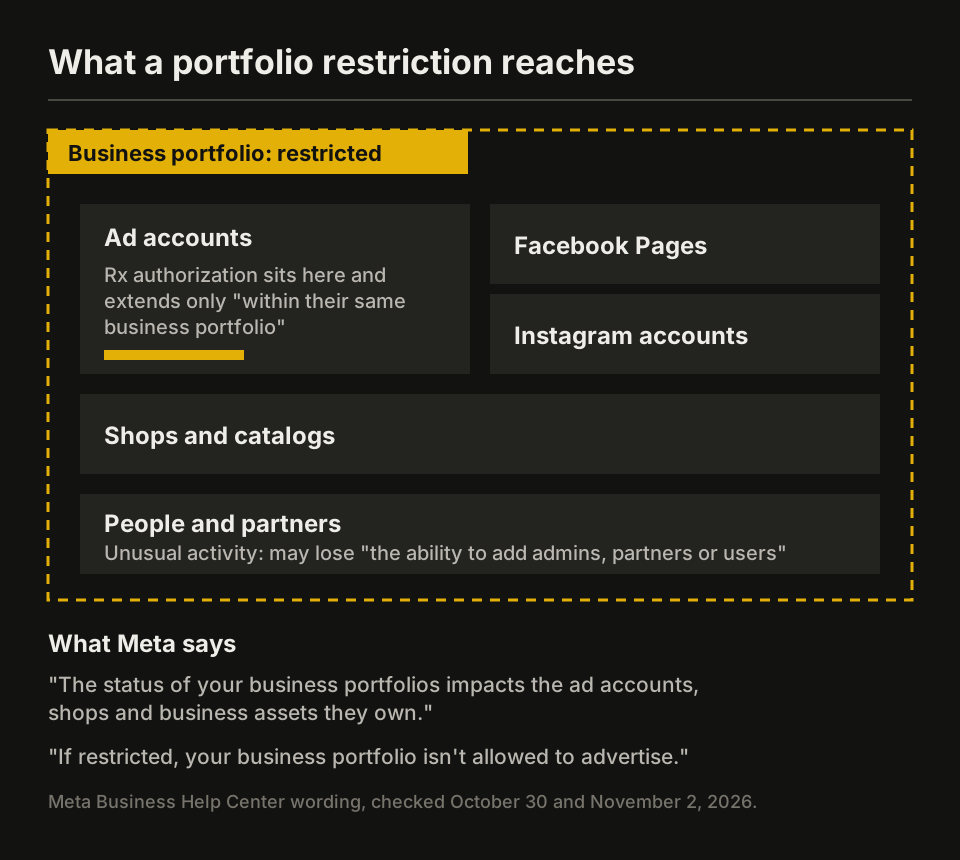
A business portfolio restriction stops advertising across the assets the portfolio owns. Meta’s Business Support Home page says: “The status of your business portfolios impacts the ad accounts, shops and business assets they own.” For a GLP-1 brand that can mean its Rx campaigns, its Pages and its agency access at once.
| Asset in the portfolio | What Meta says | Effect at a GLP-1 telehealth brand |
|---|---|---|
| The portfolio | “If restricted, your business portfolio isn’t allowed to advertise.” | Every campaign the portfolio runs stops |
| Ad accounts it owns | Status “impacts the ad accounts, shops and business assets they own” | Rx and non-Rx ad accounts stop together |
| Rx authorization | Brands can extend it “to other ad accounts within their same business portfolio” | The authorized accounts live inside the restricted portfolio |
| People and partners | Unusual activity can bring “loss of the ability to add admins, partners or users” | No new media buyer or agency partner while Meta investigates |
| New ad accounts | Unusual activity can bring “loss of the ability to create new ad accounts” | No new account to authorize for Rx |
| Pages | “Every advertiser will need to have a Facebook Page created before they can advertise.” | Pages owned by the portfolio can’t carry its ads |
A personal profile works differently. Meta says that when one person is restricted, “Any ad accounts where they’re the only attached user may also be disabled,” while “other members of the business portfolio, ad account or Page, may still be able to advertise.” If only one admin is blocked, the portfolio may still run.
Why Meta restricts a whole business portfolio
Meta restricts a business portfolio for policy violations, suspected hacking, missing two-factor authentication, payment problems, or links to accounts that break its rules. Its help pages list these causes, and its Community Standards add ownership checks:
| Cause | Meta’s wording | Source |
|---|---|---|
| Severe or repeated ad violations | “we may apply advertising restrictions on their business portfolio, ad account, Page or user account” | Common examples of policy violations |
| Suspected hack | “We suspect an advertiser’s business portfolio or business assets have been compromised or hacked.” | About advertising restrictions |
| Missing 2FA | “An advertiser doesn’t meet our two-factor authentication requirements for account security.” | About advertising restrictions |
| Payments | “unusual payment or account activity, high rates of failed payments or disputed payments” | About advertising restrictions |
| Connections | A business asset “in close connection with a network of accounts or other entities that violate or evade our policies” | Common examples of policy violations |
| Ownership checks | Meta “may request additional information about an account to ascertain ownership and/or permissible activity,” including for “Compromised accounts” and accounts run “through automated means, such as scripting” | Community Standards: Account Integrity (change log May 28, 2026) |
The policy causes specific to a GLP-1 brand sit in Meta’s Drugs and Pharmaceuticals standard: “Meta requires online pharmacies and telehealth providers to be actively certified with LegitScript.” Rx ads may “Only target people in eligible countries (United States, Canada or New Zealand)” and “Only target people 18 years or older.” When ad content “severely or repeatedly violates” Meta’s policies, the restriction can land on the business portfolio as well as on the ad account that ran it.
New portfolios start with fewer features too. Meta says “when you create a new business portfolio or ad account, you may not have access to all advertising features.” Missing features on a new portfolio aren’t always a restriction, and Business Support Home shows what you can do to get them.
Step 1: confirm the business portfolio is the restricted asset
The first step for a restricted Meta business account is to check which asset Meta restricted, because each level has its own review. In Business Support Home, Account status overview shows “whether your accounts or business portfolios are disabled or have any advertising restrictions.”
- Sign in as someone with admin access to the business portfolio.
- Open Business Support Home, then Account status overview.
- Under Recent account issues, select Outstanding and look for the portfolio itself, not an ad account or Page.
- Select it and read the What you can do section.
Business Support Home also lets you “confirm the validity of any emails, text messages, or phone calls” from someone who says they’re a Meta representative. Check any contact about a restricted portfolio there before you share logins or documents.
Step 2: secure the portfolio, admins and two-factor authentication
Securing the business portfolio comes before any review when Meta suspects a hack or missing two-factor authentication. Meta says that without 2FA it “may restrict or remove people’s access to advertising, remove their permission to manage or edit their shop, or remove a payment method.”
- Turn on two-factor authentication for every person in the portfolio. Portfolios created fewer than 90 days ago can choose to require it.
- Remove people, partners and apps you don’t recognize, and undo changes you didn’t make.
- Keep at least 2 named admins on every Rx ad account, so one restricted profile doesn’t disable an account where that person is “the only attached user.”
- Settle failed or disputed payments in Billing & payments.
Step 3: confirm identity and complete business verification
Business verification is one of the steps Meta can list under What you can do for a business portfolio. It runs from Security Center in Meta Business Suite, and only a person with full control of the portfolio can start it. Meta says verification “is required to access certain advertising, developer, billing and spending features.”
| Requirement | Meta’s wording |
|---|---|
| Who | “You must have full control of the business portfolio.” |
| Details | Name, address, phone and website must “exactly match the details of your legal business entity” |
| Website | Must load and be “HTTPS compliant” |
| Documents | If no record matches, “official documents, such as a business license or articles of incorporation” |
| Monthly invoicing | Brands on monthly invoicing can verify with their credit line information instead of documents |
| Timing | “A decision on your verification submission may take up to 14 business days.” |
| Later edits | “If you edit your business details, then you need to complete the verification process again.” |
A GLP-1 telehealth brand is checked against its entity in 3 places. Business verification needs the legal entity’s exact details, the portfolio name “should match the public name of your business,” and Rx authorization asks for “the website URL that has been certified by LegitScript.” Use the same entity, address and domain in all 3, and in your LegitScript certification.
Meta warns that false or misleading details, or an attempt “to circumvent Meta’s verification review system,” can block verification or lead to “additional action on the account.” Business verification also isn’t Meta Verified and “won’t give you a verified badge.”
Step 4: request a review of the business portfolio
Request the review only after every other step under What you can do is done. Meta’s review page covers the portfolio directly: “If you believe your business portfolio, ad account, Page or user account was incorrectly restricted from advertising, you may be able to request a review.”
- In Business Support Home, select Account status overview.
- Select the restricted business portfolio.
- In What you can do, select Request review.
- Complete the on-screen steps.
What Meta says happens next:
- Only admins can file: “To request a review, you must be an admin on the account.”
- Timing: “Typically, our review is completed in 48 hours, although it may take longer in some cases.”
- Limits: “There is a limited number of times you can request an advertising restriction review. Once the review is completed, the decision is final.”
- Outcome: if the restriction stays, “your account will be blocked”; if not, “your account will be reinstated.”
- Restart: “Any ads running before the restriction will not be automatically restarted.” Turn Rx campaigns back on in Ads Manager, only in ad accounts that still hold authorization.
If the steps on screen don’t match your situation, use Contact support in Business Support Home.
Why a new business portfolio doesn’t fix a restriction
Opening a new business portfolio to keep advertising is treated as evasion under Meta’s rules. Its policy violation examples include “Attempting to create new ad accounts or other business assets with the intent to repeat violations after we’ve disabled existing accounts.” Meta’s Account Integrity standard also lets it act on accounts “Owned by the same person or entity as an account that has been disabled.”
For a telehealth brand the business cost is concrete: Rx authorization extends only within the same portfolio, and a new portfolio starts without all advertising features. The official route keeps the authorized setup, while a rebuilt one is owned by the same entity Meta already restricted.
Telehealth checklist before the portfolio advertises again
Before a GLP-1 brand restarts spend in a reinstated business portfolio, check each item. More controls are in our guide to keeping a telehealth Meta ad account in good standing.
- Two-factor authentication is on for every person, and at least 2 people hold full control.
- Business verification is approved, and no business detail has changed since.
- LegitScript certification is active, and the certified URL is the one in your Rx authorization.
- Every Rx ad account is authorized, targets only adults 18+ in eligible countries, and runs creative that follows Meta’s weight-loss rules.
- Partners and agencies have only the access they need.
- Failed or disputed payments are settled.
Once the portfolio is in good standing and the brand plans its next stage of Meta spend, the GLP1.partners team can run GLP-1 campaigns on established agency accounts built for GLP-1 scale, with a dedicated Meta agency contact.
FAQ
How long does a Meta business portfolio restriction last? Meta gives no fixed length. A review typically takes 48 hours, verification “may take up to 14 business days,” and unusual-activity limits last “while we investigate the issue.”
Can I appeal if no ad account shows a review option? Yes. Meta’s review page lists the business portfolio as an asset you can ask it to review. Select the portfolio itself in Account status overview, as an admin.
Is a disabled business account the same as a restricted one? Meta’s help pages use “restricted” for a business portfolio that “isn’t allowed to advertise” and “disabled” for an ad account restricted for a policy violation. When the notice names the portfolio, the route on this page applies whichever word you use. One disabled ad account inside a portfolio in good standing has its own route, covered in the disabled ad account guide.
Sources
- Meta Business Help Center, About advertising restrictions (5 scenarios incl. compromised business portfolio and 2FA; business portfolio 'isn't allowed to advertise'; unusual-activity limits; personal profile note) · accessed
- Meta Business Help Center, Request a review for a restricted advertising account (business portfolio eligible; admin only; 4 steps; 48 hours; limited reviews; decision final; ads not restarted; no harm to standing) · accessed
- Meta Business Help Center, Troubleshoot a disabled or restricted account (Account Overview; confirm identity, complete verification, secure account, request review) · accessed
- Meta Business Help Center, About Meta Business Support Home (portfolio status impacts owned ad accounts, shops and assets; 14/30/90-day view; confirm Meta representative contacts; contact support) · accessed
- Meta Business Help Center, How to verify your business in Meta Business Suite (full control; Security Center; exact legal match; HTTPS; documents; monthly invoicing credit line; up to 14 business days; re-verify after edits; not Meta Verified) · accessed
- Meta Business Help Center, About two-factor authentication for your business portfolio (restrict or remove access to advertising; 90-day option) · accessed
- Meta Business Help Center, Give a partner access to business assets in your business portfolio (full control needed; agency example; partner needs its own portfolio) · accessed
- Meta Business Help Center, About Meta's Prescription Drugs advertising policy (LegitScript-certified URL; select ad accounts; extend within the same business portfolio) · accessed
- Meta Business Help Center, Common examples of Meta advertising policy violations (content, evading enforcement, violating networks or associations) · accessed
- Meta Business Help Center, How to create a business portfolio in Meta Business Suite (new portfolio may not have all advertising features; name should match public business name) · accessed
- Meta Transparency Center, Community Standards: Account Integrity (business assets incl. Business Managers; requests for information to ascertain ownership; evasion; change log May 28, 2026) · accessed
- Meta Transparency Center, Introduction to the Advertising Standards (legitimate business or individual; evading enforcement prohibited) · accessed
- Meta Transparency Center, Advertising Standards: Drugs and Pharmaceuticals (LegitScript for telehealth; eligible countries US, Canada, New Zealand; 18+) · accessed